Best Camera Field Monitors of 2026

Your camera's rear LCD is the most optimistic screen you own. It looks fine in the shade, fine at dusk, and then you get the footage home and find the focus landed two inches behind your subject's eye. A field monitor is the fix: a bigger, brighter second screen with the focus and exposure tools your camera buries three menus deep.

The tricky part is that specs don't sort the good ones from the bad. A panel rated at 2,000 nits can still wash out in direct sun, and a bargain unit can drain a battery before the second setup. We've spent six months with 11 of these, from 5-inch touchscreens to 7-inch panels, on outdoor shoots and indoor interviews alike.

Two things I'd tell anyone buying their first one: you'll reach for focus peaking and the touchscreen far more often than the LUT features, and battery compatibility will bother you more than any number on the box. The picks below are the ones that held up.

1

Best Overall

VILTROX DC-550

85 /100
LBD Score Excellent

Key details

Screen Size
5.5 inches
Battery Included
NP-F550
Native Resolution
1920 x 1080
Screen Brightness
1200 nits
View on Amazon

The DC-550 earns its place with the screen you actually look at: a 5.5-inch 1920 x 1080 IPS touch panel with an anti-glare finish, 1200 nits of brightness, and a 178-degree viewing angle. We found that combination more useful outdoors than the nit rating alone suggests, because the matte surface and the included sunhood cut the reflections that make a glossy monitor hard to read at midday. Color looks natural, and the 1200:1 contrast leaves enough separation to judge shadows.

The kit is unusually complete: an NP-F550 battery, sunhood, cold-shoe adapter, Type-C cable, and standard HDMI cable all come in the box. We appreciate that because a monitor without a power source is a paperweight until the next order arrives. The touch interface is quick for pulling up waveform, vector, false color, and 3D LUTs, though the menu rewards a few minutes of setup before the first shoot.

The feature to check before a paid job is HDMI loop-out. If you record through the monitor, test that path and keep a direct route from camera to recorder as a backup. That caveat aside, the DC-550 is the one we reach for when we want a small monitor that works in daylight without a bag of accessories. The sunhood is the detail we keep coming back to: it turns a good screen into a usable one when the sun is overhead.

Pros

  • 1200-nit anti-glare touchscreen
  • Battery and sunhood included
  • Complete exposure and focus tools

Cons

  • Brightness trails the brightest picks
Our verdict

The DC-550 is our default field monitor for most DSLR and mirrorless shooters: its 1200-nit touchscreen stays readable outdoors, and the hood and battery come in the box.
Check Latest Price
2

Best for Bright Outdoor Shoots

FEELWORLD F5 Prox

85 /100
LBD Score Excellent

Key details

Screen Size
5.5 inches
Battery Included
F750 battery
Monitoring Tools
Waveform, 3D LUT, HDR
Screen Brightness
1600 nits
View on Amazon

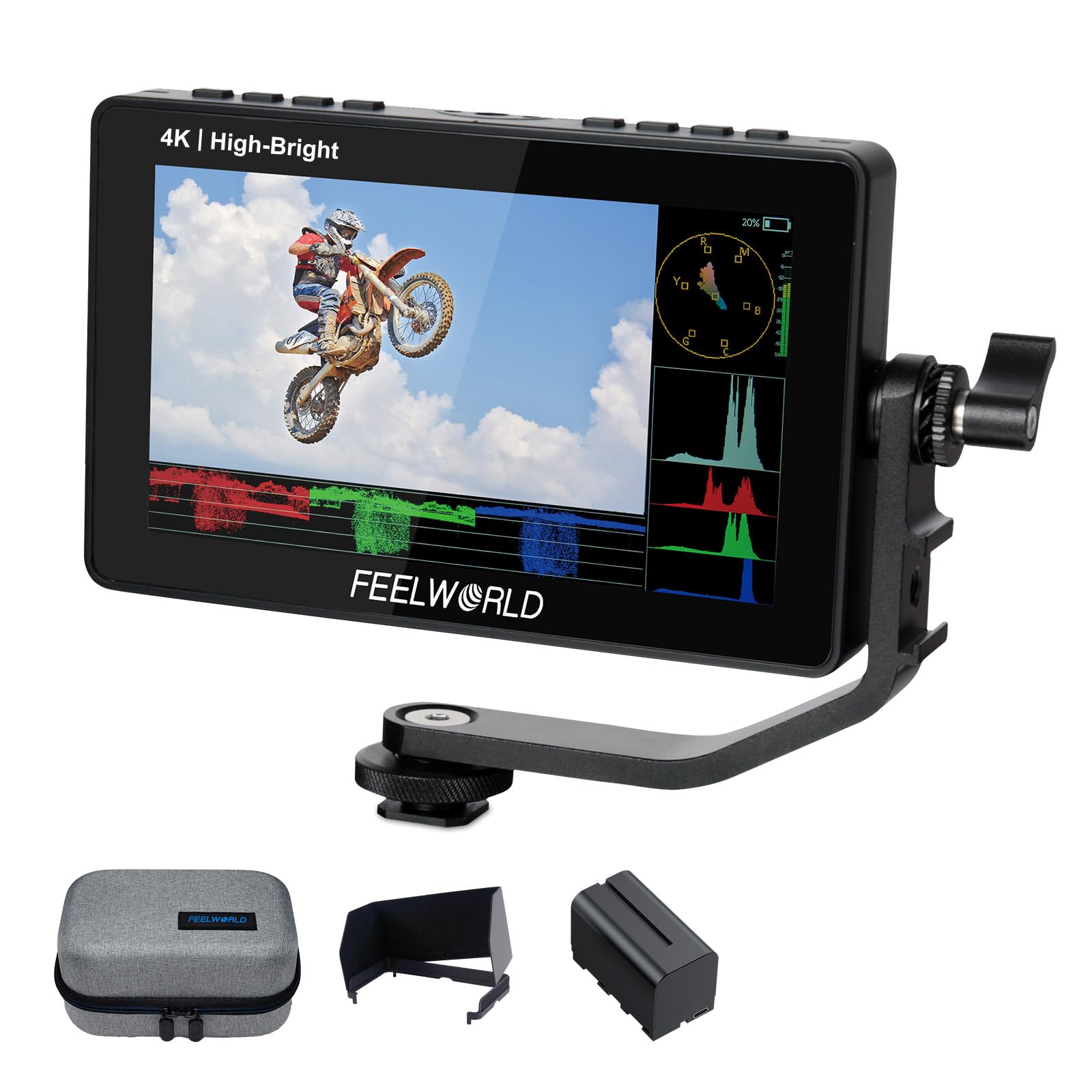
The F5 Prox is built around a 5.5-inch touchscreen rated at 1600 nits, and FEELWORLD includes an F750 battery and a carry bag rather than making them separate purchases. The package is aimed at shooters who want one order to cover the monitor, power, and transport.

That brightness is the reason we reach for it over the 1200-nit DC-550 on a sunny exterior. The screen stays readable with the sun behind you, and the touch controls make it quick to call up waveform, histogram, false color, and focus peaking. The 5.5-inch size is the sweet spot for a small mirrorless rig: big enough to judge focus, small enough that it does not make a gimbal feel top-heavy. On a handheld rig, that balance matters more than the extra width of a 6-inch panel.

The toolset includes 3D LUT and HDR support, and the F970 external kit gives you a second mounting option. The battery and bag add a little bulk, but they mean you can shoot without a separate power run, which is the trade we are happy to make for outdoor work. If you already own NP-F batteries, the included F750 is a spare rather than a new system to buy into. The bag is a small thing, but it keeps the monitor and battery together instead of letting them disappear into a camera bag.

Pros

  • 1600-nit screen for outdoor use
  • Battery and carry bag included
  • Waveform, LUT, and focus tools

Cons

  • Power-on reliability is the weak point
Our verdict

For bright outdoor shoots, the F5 Prox is the complete 5.5-inch kit we point to: 1600 nits, a battery, and a bag make it ready on arrival.

Check Latest Price
3

Best Large-Screen Monitor

NEEWER F700

86 /100
LBD Score Excellent

Key details

Screen Size
7 inches
Battery Included
No
Native Resolution
1920 x 1080
Screen Brightness
2000 nits
View on Amazon

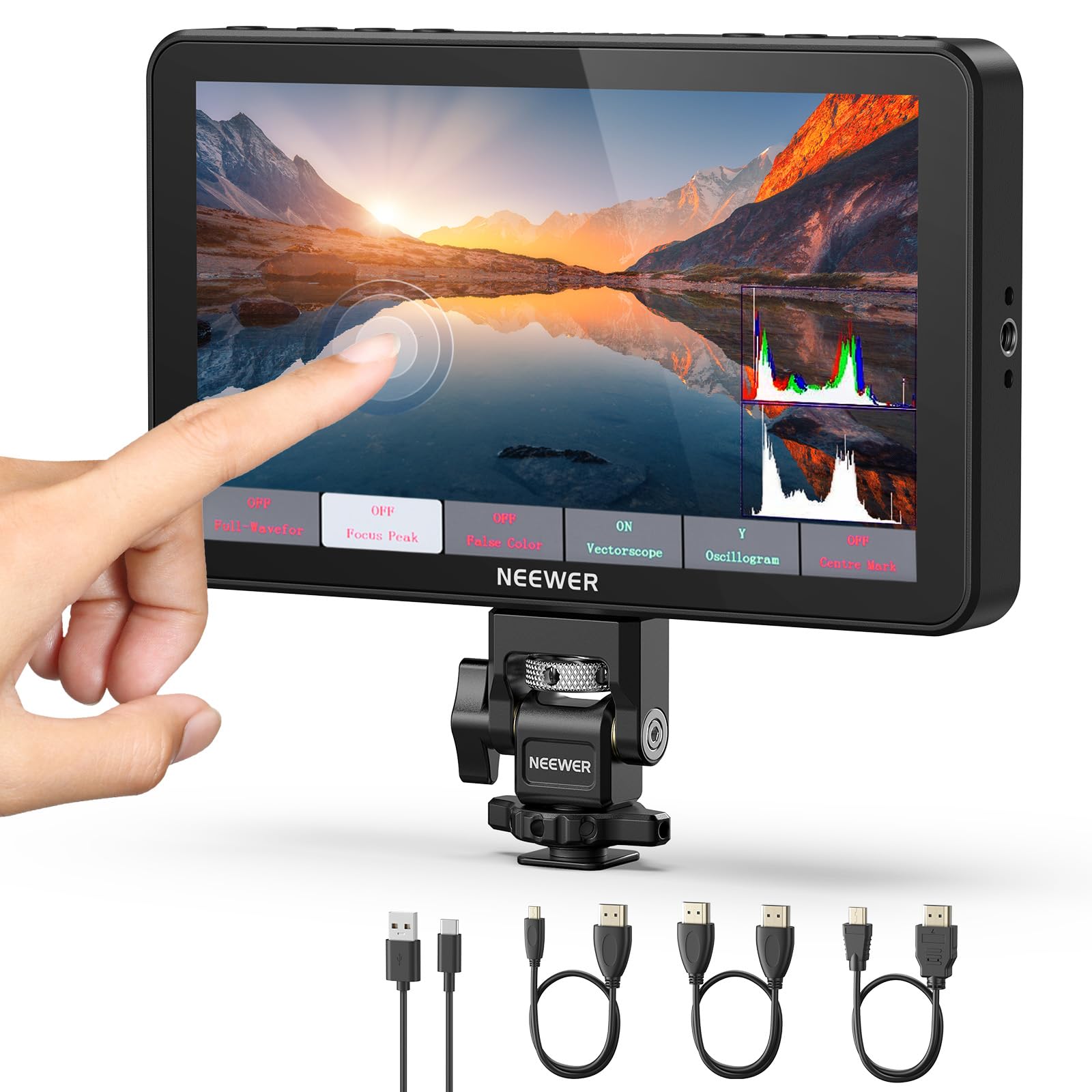
Seven inches is a different category of view. The F700's 1920 x 1080 IPS touchscreen is rated at 2000 nits, the brightest panel in this group, and the size makes it easier to see focus and framing without hunching over the camera.

That extra brightness is not marketing padding. In direct sun, the F700 stays readable in a way the 500- and 600-nit monitors here do not, and the 1000:1 contrast keeps the image from going flat. We also like that the touch UI puts waveform, false color, zebras, histogram, and 3D LUTs within a couple of taps; the 4K HDMI loop in and out and improved cooling make it feel like a working monitor rather than a toy.

The trade-off is physical: at 1.6 pounds and 7 inches wide, it can make a small mirrorless rig feel nose-heavy, and the 16:9 body is awkward for vertical-only workflows. We found the big screen worth the bulk when the camera is on a tripod or shoulder rig, where the weight is supported and the view is the point. The cold-shoe mount and 180-degree arm are the small details that let you angle it without adding a cage.

Pros

  • 2000-nit 7-inch screen
  • Bright, clear outdoor image
  • Full monitoring toolkit

Cons

  • Battery sold separately
Our verdict

We choose the F700 when the monitor is your main view: its 7-inch 2000-nit screen makes framing easy in sun and earns the extra weight on a tripod.

Check Latest Price
4

Best Budget Bundle

FEELWORLD S55 V3

82 /100
LBD Score Excellent

Key details

Screen Size
6 inches
Battery Included
NP-F battery
Native Resolution
1920 x 1080
Screen Brightness
500 nits
View on Amazon

The S55 V3 is the budget pick that does not leave you shopping for a battery the same night. For a little more than the cheapest monitors here, it includes a 6-inch 1920 x 1080 panel, an NP-F battery, and a 360-degree tilt arm.

The screen is the strongest part of the package: 500 nits, 1000:1 contrast, and a wide viewing angle make it easy to frame and check color indoors, and the 1080p resolution is sharp enough for focus on a 6-inch panel. The 360-degree arm is genuinely useful for angling the screen away from a window or toward a director.

The 500-nit brightness sets the limit. This is a monitor for interiors, tents, and overcast days; in direct sun it washes out, and the included sunhood can only do so much. We also noted that the bundle's HDMI cable is micro-HDMI, so check your camera's port before you leave the house—a mini- or full-size HDMI output needs a different cable.

One quiet advantage is the dual-purpose battery plate: it takes NP-F or LP-E6 cells, so you can run it from whatever you already own. That flexibility, plus the included battery and arm, makes the S55 V3 feel like a kit rather than a panel.

Pros

  • Battery and tilt arm included
  • Sharp 6-inch 1080p screen
  • Dual NP-F/LP-E6 battery plate

Cons

  • Short runtime at full brightness
Our verdict

The S55 V3 is the budget bundle we trust for indoor and shaded work: a sharp 6-inch screen, a battery in the box, and the core exposure tools.

Check Latest Price
5

Best Compact for Gimbals

Portkeys PT6

82 /100
LBD Score Excellent

Key details

Weight
1.1 lb
Screen Size
5.2 inches
Battery Included
No
Screen Brightness
600 nits
View on Amazon

At 0.5 kg, the PT6 is the monitor that disappears on a small rig. The 5.2-inch 1920 x 1080 touchscreen is sharp, with 400 PPI and a 178-degree viewing angle, and the body is slim enough to leave on a gimbal between setups.

What we appreciate most is the size-to-view ratio: the screen is small enough to keep a handheld rig balanced but still clean enough to judge focus, and the touch interface is responsive. Eyelashes in a close-up stayed distinct on the 5.2-inch panel, which is not something we can say for every small monitor here. The 600-nit panel is best for shaded exteriors and interiors; it is not the monitor to choose for midday sun, where the brighter picks here have a clear advantage.

The PT6 accepts Sony NP-F or Canon LP-E6 batteries, which is convenient if you already own either system. The touch controls cover waveform, 3D LUT, anamorphic desqueeze, and peaking without burying them in submenus. The touch response is what we kept coming back to; it keeps up with quick exposure changes.

Pros

  • Light 0.5 kg body
  • Sharp 5.2-inch 1080p touchscreen
  • Accepts NP-F or LP-E6 batteries

Cons

  • No battery in the box
Our verdict

We like the PT6 for gimbal and handheld work: its 5.2-inch 1080p screen and 0.5 kg body keep a small rig balanced, and it accepts either battery type.

Check Latest Price
6

Low-Cost Framing

Portkeys HD7H

78 /100
LBD Score Very Good

Key details

Weight
9.81 oz
Screen Size
7 inches
Native Resolution
1280 x 720
Screen Brightness
1000 nits
View on Amazon

The HD7H's 1280 x 720 native resolution is the first thing to understand: at 7 inches, it is fine for framing and exposure, but it is not the panel to choose if you pull focus by eye on wide shots. What you get for the low price is a 1000-nit screen, a 1000:1 contrast ratio, and a lightweight 278-gram body with 1/4-inch-20 threads on three sides.

We found the brightness more useful than the resolution in practice. The 1000-nit panel is readable outdoors, and the included sunshade helps, while the luma histogram, false color, peaking, zoom, and anamorphic de-squeeze cover the basics. The 3.5mm headphone jack and AV input are handy if you are monitoring audio or working with older gear.

The risk is reliability: a unit that will not power on or drops the HDMI signal is the failure to check for. That puts the HD7H in second-monitor territory—good for a director's view or a backup framing screen, not the only monitor on a paid shoot. The three mounting threads are a small but welcome detail: you can hang it on the side of a cage without hunting for an adapter.

Pros

  • 1000-nit 7-inch screen
  • Light 278 g body
  • Useful framing tools

Cons

  • Battery not included
Our verdict

We see the HD7H as a low-cost framing monitor: a 7-inch 1000-nit screen and a 278-gram body make it easy to add to a cage or director's rig.

Check Latest Price

How We Tested 11 Field Monitors in the Field

We started by pulling together every field monitor we could find in the 5- to 7-inch range with 4K HDMI input and output, then cut the list down by brightness claims, battery type, whether a sunshade came in the box, and whether the panel offered touch controls or buttons only. That left 11 monitors, which we used over six months.

Each one went out on real shoots: two outdoor interviews at midday, a run-and-gun street shoot, and a stretch of indoor talking-head work where I mounted it on a tripod next to the camera. I pointed every monitor at the same sunlit brick wall and noted where the image stopped being readable, then checked whether the waveform and peaking were still legible at that brightness rather than just whether the screen glowed.

Battery life got timed, not estimated. I ran each monitor at full brightness with a 4K signal running through it and clocked how long it lasted on whatever pack it takes, from F750/F970-style batteries down to smaller cells, and noted whether the included plate matched batteries I already owned. HDMI testing meant feeding a 4K signal in, looping it out to a recorder, watching for dropouts, and judging whether the touch tools kept up with the picture.

Finally, we lived with them: packed them into bags, mounted them on cold shoes and magic arms, tapped the touchscreens with cold hands, and judged whether the buttons and ports felt like they would survive a season. Screen size was the honest tradeoff every time, since a 7-inch panel is lovely to focus on and awkward to balance on a small rig, and value came down to how much of the toolset you actually reach for.

How to Choose a Camera Field Monitor

Match brightness to the light you shoot in

Brightness is the first specification that changes the buying decision. A 400- to 600-nit panel is fine indoors, under a tent, or on an overcast day; once you move into direct sun, 1000 nits is the practical floor, and 1600 to 2000 nits gives you more headroom. A sunhood helps at any brightness, which is why we prefer kits that include one. Higher brightness also pulls more power and can add heat, so pair a bright panel with a spare battery or a DC source.

If most of your work is interviews or studio shooting, spend the difference on resolution and tools instead of chasing the highest nit rating.

Choose size and resolution for the view you need

Five to 5.5 inches is the sweet spot for most mirrorless rigs: large enough to judge focus, small enough to keep a gimbal balanced. A 7-inch monitor is easier on the eyes and better for a director's view, but it adds leverage and weight on a small camera. Resolution matters more as the screen grows: 1920 x 1080 is sharp on a 5- or 6-inch panel, while a 7-inch 1280 x 720 screen can look soft and is better for framing than critical focus. Handle the rig before you commit.

Plan power and mounting before the first shoot

Monitors run on NP-F or LP-E6 batteries, DC power, USB-C, or a built-in cell, and the box does not always include a battery. Check what is included before you compare prices: a cheap monitor that needs a battery, charger, and cable can cost more than a bundle. Two batteries are sensible for a full outdoor day. Mounting matters just as much: 1/4-inch-20 threads and a cold-shoe adapter are the basics, and a tilt arm helps you angle the screen without adding a cage.

Check the HDMI path and the assist tools

Confirm the camera's HDMI connector—full-size, mini, or micro—and make sure the monitor's cable matches; the wrong cable can make a good monitor useless on the first shoot. If you plan to loop the signal to a recorder or client monitor, test that pass-through before a paid job, because it is a more delicate feature than simple monitoring. For exposure and focus, look for waveform, false color, peaking, zebras, and histogram. A 3D LUT is useful if you shoot log and want a normalized view on set.

Frequently Asked Questions

Final Verdict

The VILTROX DC-550 is our default field monitor for most DSLR and mirrorless shooters. Its 1200-nit anti-glare screen is bright enough for outdoor work, the included hood and battery make it usable on day one, and the exposure tools are complete without turning setup into a project. It is the most balanced package here.

If direct sun is the dominant condition, the FEELWORLD F5 Prox is the brighter alternative and still comes as a kit. If you want the largest view and do not mind carrying a heavier rig, the NEEWER F700's 7-inch 2000-nit screen is the one to choose. The DC-550 remains the safer default for mixed shooting.