Best Digital Mixers of 2026

The real choice with digital mixers isn't channel count — it's whether you want knobs under your fingers or a tablet in your hand. A small board with real faders and eight inputs costs about what a rack box with sixteen inputs and no controls on it does. Either way, the job is the same: turning a stage of microphones, DIs, and backing tracks into a mix you can actually shape, and recording it on the way through so the night isn't gone forever.

We've spent the past eight months with eight of these, from compact boards to rack units to one recorder that moonlights as a mixer, running them in a basement rehearsal space, a rented hall, and a spare-room podcast setup. I mixed a four-piece band from a tablet for six weeks and resented it for the first three.

Here's what nobody tells a first-time buyer: the preamps and the number of separate monitor mixes matter far more than whether the box says 12 inputs or 20, and the control app is part of the mixer whether you like it or not. A board that drops its tablet connection mid-set is a paperweight with XLR jacks. The picks below are the ones that held up on a Tuesday night, whether you're running a four-piece in a basement or a twelve-input hall gig.

1

Best Overall

Behringer XR18

90 /100
LBD Score Outstanding

Key details

Weight
7.1 lb
Channels
18
USB Audio
18 x 18 bidirectional
Mic Preamps
16 programmable Midas
View on Amazon

Sixteen Midas-designed mic preamps, 18 inputs, and an 18-by-18 USB interface for about the same money as the 16-input Soundcraft and less than the Tascam: that arithmetic is why the XR18 is the first mixer we hand people. It covers a four-piece band with a drum kit to mic, a streaming desk with several hosts, and a studio that needs clean preamps and a path back to the computer, and it does all three without asking you to buy twice.

The control model is the whole story. There are no faders; you mix on an iPad or Android tablet over the mixer's own Wi-Fi, with scenes that recall an entire venue's settings in one tap. When the network behaves it is liberating, and we set levels from the back of the room during soundcheck without walking back to the desk. Sort out the internal router before the first gig: a small external router or access point, or a wired Ethernet run, turns a flaky connection into one that simply holds.

Around that, the hardware is right. Sixteen combo XLR and quarter-inch jacks plus a pair of line inputs, XLR mains, and 7.1 pounds in a chassis one person can carry under an arm. The preamps are the Midas-designed ones from Behringer's larger consoles, and the multitrack captures we made through the USB interface came back clean and quiet.

Two boundaries worth knowing. A solo performer with four sources is paying for channels that will sit empty, and the FLOW 8 handles that job with faders and Bluetooth. And the tablet has to be charged, paired, and awake, so keep a spare or a charging cable in the case. Everyone else gets the most capability per dollar in this group.

Pros

  • 16 Midas-designed preamps at a midrange price
  • 18-by-18 USB interface for recording and playback
  • Scenes recall a whole venue's settings
  • 7.1 pounds, easy for one person to carry

Cons

  • Tablet-only control with no fader bank
Our verdict

We recommend the XR18 first because it covers the most ground for the money: 16 Midas preamps, 18 inputs, and multitrack USB in one 7-pound box.

Check Latest Price
2

Best for Solo Acts and Streaming

Behringer FLOW 8

92 /100
LBD Score Outstanding

Key details

Faders
60 mm channel faders
Channels
8
Wireless
Bluetooth audio and app control
Mic Preamps
2 Midas with 48 V
View on Amazon

A solo act or a one-person stream is a different problem from a band: four sources at most, nobody running sound, and ten minutes to set up. The FLOW 8 is sized for exactly that, with eight inputs, two Midas preamps with phantom power, 60 mm faders you can grab, and a master knob with an LED collar so you can find your level in a dark room.

What we keep coming back to is EZ-Gain. Rather than setting gain by ear channel by channel, you let the mixer analyze what is plugged in and set headroom for you, then trim from there. On a gig where you are also the person singing, that is the most useful button on the box.

It is also the most portable thing here by a wide margin, at 1.1 inches tall and 1,400 grams, so it goes in a bag next to a laptop. Two effects processors cover reverb and delay, and Bluetooth brings in a phone or a backing track without a cable. Treat the micro-USB power jack as the fragile part and keep the cable where nobody kicks it.

The limit is preamps, not inputs. Two mic preamps means two microphones plus line sources such as a keyboard, a laptop, or a phone, so a four-piece with a drum kit is out and that is XR18 territory. Everything else about it is right-sized, and the faders alone put it ahead of an app-only box for someone who has to mix and perform at the same time.

Pros

  • Real 60 mm faders and a physical master knob
  • EZ-Gain sets headroom automatically
  • Bluetooth streaming straight into the mix
  • 1.1 inches tall and 1,400 grams

Cons

  • Only two mic preamps for eight inputs
  • Bluetooth range is shorter than expected
Our verdict

For a solo act or a streamer, this is the mixer to buy: real faders, two Midas preamps, Bluetooth playback, and a footprint that fits in a bag.

Check Latest Price
3

Best Battery-Powered Pick

Zoom LiveTrak L-8

88 /100
LBD Score Excellent

Key details

Power
Battery or AC adapter
Channels
8
Recording
12 tracks to SD at 24-bit/96 kHz
Headphone Outputs
4
View on Amazon

We kept reaching for the L-8 whenever there was no outlet in reach, and that is the argument in one line: batteries in, card in, and a rehearsal or a podcast records itself with no laptop in the room. Twelve tracks at 24-bit/96 kHz land on the SD card, and the same performance can go to a computer over USB at the same time.

Podcasters get the most out of it. Six combo inputs plus two stereo channels, four headphone outputs across three independent mixes, sound pads for stings, and a phone input on TRRS mean a three-host show with a remote guest fits without a workaround. The faders are real as well, so the board still works as a mixer when the screen is showing something you do not need.

The friction is depth. Almost everything past the fader, from EQ and effects to routing and recording setup, is a button press or three, and the small display means reading abbreviations at soundcheck rather than glancing at a knob. Test your SD recording in the first week and buy where returns are easy: screens can die and computers can produce garbled playback, and that is better discovered at home than on air.

Pros

  • Records 12 tracks to SD without a computer
  • Four headphone outputs across three mixes
  • Runs on batteries or the included adapter
  • Records to card and computer at once

Cons

  • Menu-heavy for EQ, effects, and routing
Our verdict

The L-8 earns its place as the recording-first choice: 12 tracks to a card, four headphone mixes, and battery power when there is no outlet.

Check Latest Price
4

Best for Full Bands

Zoom LiveTrak L-20

88 /100
LBD Score Excellent

Key details

Channels
20
Recording
22 tracks to SD at 24-bit/96 kHz
Preamp Noise
-128 dBu EIN
Monitor Outputs
6 with individual volume
View on Amazon

Start with the catch, because it decides who should keep reading: the L-20's channel EQ is global. Shape a channel in the main mix and you have shaped it in every monitor mix too, and there is no Q control on the midrange. If your drummer wants a different snare in their ears than the room gets, this mixer cannot give it to them.

What it can do is put a full band on one box. Twenty inputs, 22 tracks to an SD card at 24-bit/96 kHz, 20 onboard effects, and six headphone and line outputs with individual volume, one for every member of a six-piece, each with their own balance. The preamps are rated to -128 dBu EIN with up to +60 dB of gain, and the board ran quiet in our sessions with gain to spare.

Six monitor mixes is the reason this costs more than the compact picks, and for a working band it is the right place to spend. It is also the real difference from the app-controlled mixers here: the L-20 runs a show with no network at all, and the wireless iOS control is a bonus rather than a dependency.

Two things to plan around. At 17.5 by 15.3 inches it is a table-sized board rather than something you sling in a bag. And using the USB interface for input and output at the same time has been unreliable, so record to the card and let the computer handle playback; the problem does not come up that way.

Pros

  • Six independent monitor mixes with own volume
  • 22 tracks to SD at 24-bit/96 kHz
  • 20 onboard effects
  • Runs a show with no network or tablet

Cons

  • Channel EQ is global with no midrange Q
  • Table-sized footprint
Our verdict

Twenty inputs, six monitor mixes, and 22-track recording make the L-20 our pick for a full band that wants faders instead of a tablet.

Check Latest Price
5

Best for Home Studios

Tascam Model 12

86 /100
LBD Score Excellent

Key details

Weight
13.3 lb
Channels
12
Recording
12-track to SD card
USB Audio
12 in / 10 out
View on Amazon

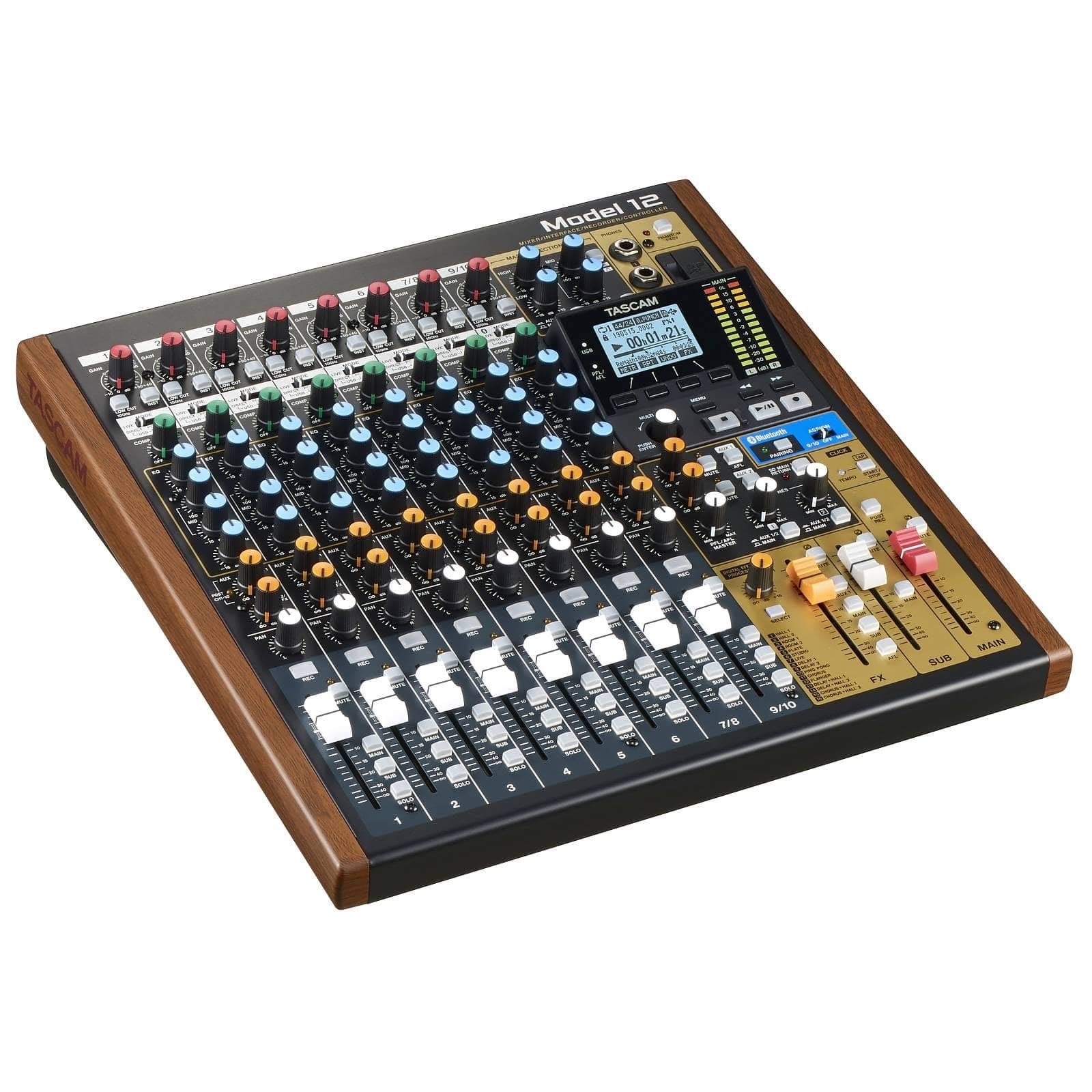
Three bands of EQ and a one-knob compressor on every input, real faders, and a 12-track recorder to an SD card underneath: the Model 12 puts a knob-per-function surface and a recording studio in the same chassis, and for a home studio that makes it the most natural fit of the group.

The workflow is what sells it. Arm the card recorder and everything you normally do in software, from trim to EQ to compression, happens under your fingers before the signal ever reaches the computer, and the same surface doubles as a 12-in/10-out USB interface and a DAW controller. We found the knobs and buttons noticeably lighter in the hand than the faders, which feel properly weighted.

The friction is on the computer side. Windows needs its driver configured properly before multitrack behaves, and units have hit pops, distortion, or a frozen control surface. Install the current driver and firmware, keep the card recorder running as a safety net, and buy where returns are easy. Compared with the Zoom L-8 you give up battery power and a fourth headphone mix and gain controls you can feel; if the work happens at a desk, that is the right trade.

Pros

  • EQ, compression, and faders on every channel
  • 12-track recording straight to a card
  • 12-in/10-out USB interface and DAW control
  • Bluetooth and MIDI built in

Cons

  • Knobs and buttons feel light next to the faders
  • Windows driver setup can trip up multitrack
Our verdict

Buy the Model 12 if you work at a desk: a knob and fader for every channel, 12-track card recording, and a USB interface in one chassis.

Check Latest Price
6

Shared Venues

Soundcraft Ui16

88 /100
LBD Score Excellent

Key details

Control
Browser over Wi-Fi or Ethernet
Channels
16
Rack Size
19-inch, 4.3 inches tall
Processing
dbx, DigiTech, and Lexicon
View on Amazon

Same money as the XR18, two fewer inputs, and one difference that decides installations: the Ui16 has no app. Open a browser on any phone, tablet, or laptop on the network and the whole mixer is there, with nothing to install, nothing to update, and nothing to sign into. In a room where the person mixing changes every week, that is worth more than two channels.

The hardware is a 19-inch rack unit 4.3 inches tall and under eight pounds, with eight XLR combo jacks, four more XLR mic inputs, two instrument inputs, stereo RCA, four XLR aux outs, and a two-channel USB media player. Processing comes from dbx, DigiTech, and Lexicon, and the dbx AFS2 feedback suppression earns its keep in any room where the monitors sit close to the mics.

We rank it below the XR18 because of what sits around the edges. The preamps are good rather than remarkable, the noise floor is worth listening for before you commit to studio work, and the built-in Wi-Fi is the weakest link, so plan on a wired Ethernet run or a better antenna and treat wireless as a convenience for walking the room. Units have also dropped their connection for good, which is a hard failure when a browser is your only control surface.

None of that rules it out for a church, a club, or a school where the mixer lives in a rack and volunteers rotate through. It rules it out where the mixer is also the studio interface and the same two hands work it every day.

Pros

  • Browser control with no app to install
  • 16 inputs with dbx and Lexicon processing
  • 19-inch rackmount chassis
  • dbx AFS2 feedback suppression on board

Cons

  • No hardware control surface at all
  • Hiss can show up on quiet channels
Our verdict

The Ui16 is the pick for volunteers and shared rooms: 16 inputs, dbx and Lexicon processing, and browser control from any device on the network.

Check Latest Price

How We Tested Digital Mixers in Real Rooms

We built the shortlist from about 30 mixers and cut it with three blunt filters: a gain stage you can actually reach, multitrack audio over USB to a computer, and a feature set that makes sense at its price. That left eight units, which we used for eight months across four recurring scenes.

Those scenes were a basement rehearsal with a four-piece band, a rented hall where we ran three vocal mics, drum overheads, and a DI'd bass, a carpeted spare room set up for two-host podcast recording, and a solo desk for tracking one instrument at a time. We set gain on the loudest drummer we know and noted how much usable range was left before clipping, then pushed a vocal to the edge of feedback on the same monitor and wrote down where it broke.

For controls and ease of use, we ran entire three-hour rehearsals from a tablet or phone, walked to the back of the room and behind a wall to see whether the wireless link held, and handed the app to a bandmate who had never touched a digital mixer to time how long it took them to find one channel. We also cut power at the strip mid-session to see if settings survived. Each unit went into both Mac and Windows machines with two different DAWs, plus a fifteen-year-old keyboard and a cheap bass DI.

Build quality we judged by packing and unpacking each mixer ten times, wiggling every connector, and checking whether jacks sat flush and power inlets stayed put — and whether the supply was internal or a wall wart you can leave on a stage. Finally, we priced out what each one needs to actually work, like a tablet, a router, or an SD card, because a bargain mixer that demands extra gear isn't one.

How to Choose a Digital Mixer

Count Inputs and Preamps Separately

The number on the box is not the number of microphones you can plug in. The Behringer FLOW 8 has eight inputs but two mic preamps; the XR18 has 16 combo jacks with Midas preamps; the Soundcraft Ui16 spreads 16 inputs across combo jacks, XLR-only mic inputs, and instrument inputs. Count the sources that need phantom power or a mic first, then the line-level ones such as a keyboard, a laptop, or a phone, and add two spare channels.

A four-piece band with a drum kit runs out of eight inputs quickly, and moving from 8 to 16 costs less than buying a second mixer later.

Decide Who Holds the Controls

Faders are the safest thing in a dark room: nothing to pair, nothing to recharge, and every channel is one grab away. Tablet and browser control lets you walk the room and mix from where the audience sits, and it lets a performer adjust their own monitor mix from a phone. The trade is obvious, because remote control runs on a network.

Treat the built-in Wi-Fi on these mixers as a convenience rather than infrastructure. Budget for a small external router or a wired Ethernet run and both the XR18 and the Ui16 become far steadier under pressure.

Choose Card Recording or a Computer Interface

Every mixer here can feed a computer over USB, but only the Zoom and Tascam models also record to an SD card on their own. That difference decides how much gear sits between you and a finished take: a card recorder captures the show whether or not a laptop turns up and whether or not its drivers behave, while a USB-only mixer needs a DAW running and a machine that is not asleep.

The Zoom L-8 will record to a card and to a computer at the same time, which is the belt-and-suspenders setup we prefer: card for the safety copy, computer for the edit.

Count Monitor Mixes, Not Just Channels

A mixer's channel count says nothing about how many people can hear themselves. The Zoom L-20 gives six headphone and line outputs with individual volume; the Zoom L-8 gives four headphone outputs across three independent mixes. For a band, running out of monitor mixes hurts more than running out of channels, because everyone ends up sharing one balance and nobody is happy.

Add up the performers who need their own mix before you compare anything else. If everyone shares a single mix, any mixer here will do.

Match the Box to Where It Lives

A rack in a closet and a bag in a trunk are different products. The Soundcraft Ui16 is a 19-inch rack unit 4.3 inches tall, the FLOW 8 is barely an inch thick, and the Zoom L-8 runs on batteries so a rehearsal in a park needs no outlet.

Decide where the mixer will sit and whether anyone else will move it. Weight and power start to matter more than channel count the moment the gear leaves the house.

Frequently Asked Questions

Final Verdict

Digital mixers stop being intimidating the moment you decide who is holding the controls. If the answer is a tablet, the Behringer XR18 is the best buy here: 16 Midas preamps, 18 inputs, multitrack USB, and a 7-pound chassis that fits under one arm, all at a midrange price.

If the answer is your hands, go the other way. The Zoom L-20 for a full band with monitor mixes to feed, or the Behringer FLOW 8 for a solo act who wants faders, Bluetooth, and nothing else in the bag.