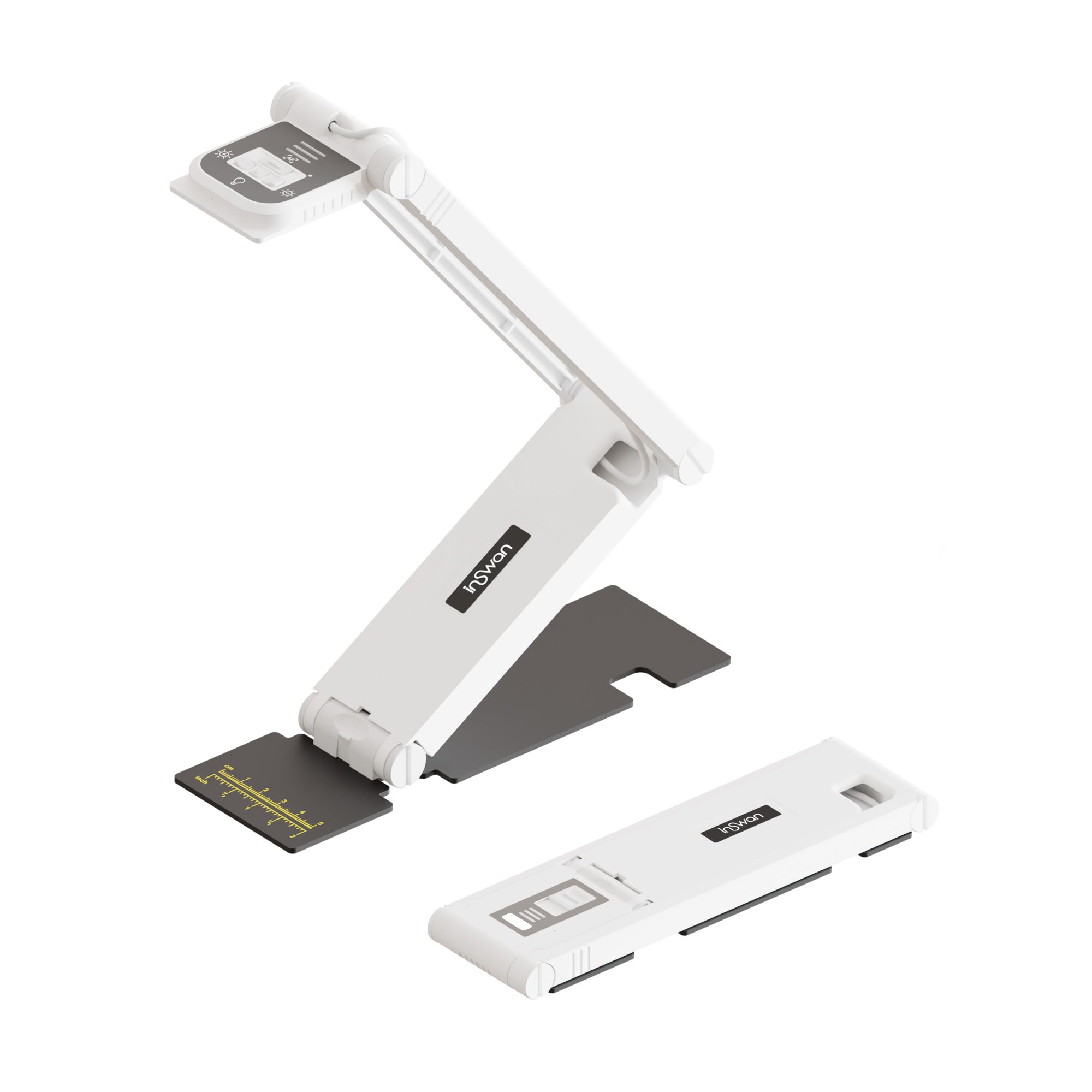
Best Document Cameras of 2026

I once taped a phone to a desk lamp to show a class a worksheet, then spent twenty minutes readjusting it while everyone waited. A document camera is that setup with the guesswork engineered out: a rigid arm holds a lens over the desk so your hands stay free and the page stays in frame.

Over the past six months, my team and I have kept eleven of them on our desks through real lessons, tutoring sessions, and live demos. Autofocus drew the first line between them — some lock on instantly, others hunt every time a hand crosses the page. We also watched how adjustable each arm really was, whether the built-in lights blew out a glossy textbook, and how the picture held up zoomed in on small print.

Here's what first-time buyers get wrong: resolution is the least useful number on the box. A modest sensor behind a good lens beats a bigger count behind a soft one, and an arm that stays where you put it matters more mid-lesson than any spec sheet. The picks below are the ones we'd leave on our own desks.

1

Best Overall

INSWAN INS-1

92 /100
LBD Score Outstanding

Key details

Video
1080p at 30fps
Capture Area
14.72 x 11 in
Light And Audio
Built-in LED and mic
Still Resolution
8MP (3264 x 2448)
View on Amazon

A built-in LED, a microphone, and an 8MP sensor in one compact arm—that combination is why the INSWAN INS-1 is our top pick. For most teachers, the camera has to do three things well: show a worksheet clearly, survive being moved between desks, and not require a second bag of accessories. The INS-1 covers all three without making you think about them.

The 8MP stills resolve 3264 x 2448, and video runs at 1080p and 30fps. We found that enough for handwriting, textbook pages, and the occasional science demo, and the 16x digital zoom lets you fill the frame with a small object when you need to. The multi-joint arm reaches a 14.72 x 11-inch area, so a two-page spread fits without repositioning the base. Digital zoom is a convenience, not a substitute for putting the camera closer to the detail.

Setup is USB-A and straightforward, with Documate software for zoom, annotation, and image flip. The controls are useful, but the software is where the camera's personality lives; if you only need a clean video feed, you can ignore most of it. Autofocus is quick enough for page turns, though it can hunt when a page shifts under your hand, so give it a moment to settle before you write.

What we appreciate most is the anti-glare sheet and microscope adapter in the box. Those are not headline features, but they turn a glossy worksheet or a close-up object into something the class can actually see. The adapter also opens up close-up demonstrations without a second camera, which is more than most classroom setups ask for.

Pros

  • 8MP stills with built-in LED and mic
  • Compact multi-joint arm covers 14.72 x 11 in
  • 16x digital zoom and Documate software
  • Anti-glare sheet and microscope adapter included

Cons

  • USB only, with no HDMI or Wi-Fi
Our verdict

We recommend the INS-1 as the default classroom camera: it pairs an 8MP image with a built-in light and microphone in a compact USB body.

Check Latest Price
2

Best for Detailed Stills

IPEVO V4K

91 /100
LBD Score Outstanding

Key details

Video
1080p at 30fps
Weight
1.3 lb
Capture Area
13.46 x 10.04 in
Still Resolution
8MP (3264 x 2448)
View on Amazon

The IPEVO V4K's strongest number is not its video frame rate; it is the 3264 x 2448 still resolution. That is the figure to care about if you photograph worksheets, sketch details, or pages of notes and want the result to hold up when a student zooms in later. Video is 1080p at 30fps, with full-resolution stills dropping to a slower 15fps.

We think that still-first approach is right for a certain buyer: someone who already has a lit room and a separate microphone, and who mostly wants a clean overhead view for notes and stills. The 8MP sensor delivers the kind of detail that makes a worksheet readable, and the 72-degree lens covers a 13.46 x 10.04-inch area without pushing the stand to its limit. The camera is light enough to move between desks, but the arm has a little less reach than the INSWAN's.

The multi-joint stand is more repairable than most: the joints can be tightened if daily use loosens them, which is a small design decision we appreciate. The attached 4.9-foot USB cable is long enough to reach a desktop tower or a wall adapter, and the 1.3-pound body is easy to move. The joint-tightening fix is the detail that makes it feel like classroom equipment rather than a disposable gadget.

Pros

  • High 3264 x 2448 still resolution
  • Smooth 1080p at 30fps
  • Multi-joint arm with tighten-able joints
  • Simple USB connection

Cons

  • No built-in light or microphone
  • Autofocus can drift between materials
Our verdict

The V4K is our pick for detailed stills and a simple USB workflow, provided your room already has light and audio covered.

Check Latest Price
3

Best Budget

THUSTAR 8MP

87 /100
LBD Score Excellent

Key details

Video
4K at 30fps
Weight
1.85 lb
Light And Audio
3-level LED, dual mics
Still Resolution
8MP
View on Amazon

The THUSTAR is the budget pick that does not feel like a compromise on paper: 8MP stills, 4K video, a three-level LED, dual microphones, and a foldable stand. The price tier is the point. If you need a camera for a classroom or a home desk and cannot justify a premium model, this is where we start.

The image is clear enough for handwriting and printed pages, and the USB-C adapter is a practical addition for newer MacBooks and laptops that have dropped USB-A. The 4K label deserves a caveat: it refers to video output, while the sensor is 8MP, so this is not a 13MP close-up camera. For a document camera, 8MP is still a sensible sweet spot, and the light and dual mics save you from adding accessories.

For us, the value case holds because the THUSTAR covers the classroom basics without asking you to learn much software. The stand folds small, the buttons handle image flip and brightness, and the dual mics mean you can record a quick explanation without adding a headset. The two-year warranty is the quiet extra that makes the budget choice feel less disposable.

Pros

  • 8MP stills and 4K video
  • Three-level LED and dual mics
  • USB-C adapter included
  • Foldable stand and two-year warranty

Cons

  • Automatic focus only, with no manual ring
Our verdict

The THUSTAR is the budget 8MP camera we point to when a classroom needs a light, mic, and 4K video without a premium spend.

Check Latest Price
4

Best Portable

INSWAN INS-Flip 4

82 /100
LBD Score Excellent

Key details

Video
4K
Weight
0.67 lb
Folded Size
8.58 x 2.46 x 0.68 in
Still Resolution
13MP
View on Amazon

The INS-Flip 4 folds to 8.58 x 2.46 x 0.68 inches and weighs 0.67 pounds, which is the kind of specification that changes how you use a document camera. It can live in a laptop bag, come out for a tutoring session, and go back without clearing a desk. For teachers who move between rooms, that is not a minor convenience; it is the reason to choose this camera over a bigger stand.

The 13MP Sony sensor and 4K video put it near the top of this group on image resolution, and the built-in LED and microphone mean it can work without a separate light or headset. The arm extends to cover documents larger than B4, and the metal base is magnet-friendly, which is a neat trick for holding a positioning guide or keeping the camera planted on a metal cart. Macro focus starts at 3.9 inches, so close-up demos are possible.

Our verdict is that the INS-Flip 4 is the one to pack if portability is the deciding requirement. It is the camera we reach for when the lesson has to happen somewhere other than the usual desk. The included anti-glare sheet and microscope adapter round out the kit without adding bulk.

Pros

  • 13MP 4K sensor
  • Folds to 0.68 in and weighs 0.67 lb
  • Built-in LED and microphone
  • Magnet-friendly metal base

Cons

  • USB-only, with no HDMI or Wi-Fi
Our verdict

The INS-Flip 4 is the camera to pack when portability matters: it folds to 0.68 inches, weighs 0.67 pounds, and still captures 13MP 4K images.

Check Latest Price
5

Best Wireless

IPEVO VZ-X

86 /100
LBD Score Excellent

Key details

Battery
9-12 hours
Connection
Wi-Fi, HDMI, USB
Wireless Range
Up to 33 ft
Still Resolution
8MP
View on Amazon

The IPEVO VZ-X is built around a different question: what if the camera cannot stay tethered to a laptop? Its 9-to-12-hour battery and up-to-33-foot wireless range let you put the camera over a demonstration table, a science experiment, or a student's desk while the computer stays connected to the projector. That is a genuinely different kind of flexibility from a USB stand.

It is also the most flexible camera here on connections, with Wi-Fi, HDMI, and USB modes. Wireless and HDMI output 1080p, while USB mode is where the 8MP still resolution lives. For reading a worksheet, 1080p is fine; for capturing detailed artwork or fine print, USB is the mode to use.

Its swiveling head and multi-joint stand make it easier to aim at a vertical demo or a flat page without moving the base, and the built-in LED helps in a dim room. If the HDMI source is not selected, the screen can stay black; check the input before class. That is a small habit, but it is the difference between a smooth start and a room full of people watching you troubleshoot.

Our judgement is that the VZ-X earns its premium only when wireless or HDMI freedom is the point. If you teach from a fixed desk with a USB port nearby, the INSWAN INS-1 gives you a light, mic, and 8MP sensor for much less. The 33-foot range and 9-to-12-hour battery are the two figures that decide whether this camera belongs in your room.

Pros

  • Three connection modes: Wi-Fi, HDMI, USB
  • 9-to-12-hour battery
  • 33-foot wireless range
  • Swiveling head and multi-joint stand

Cons

  • Heaviest camera here at 2.6 pounds
Our verdict

The VZ-X is the best choice here for wireless or projector-connected teaching, as long as you can live with 1080p in those modes.

Check Latest Price
6

Button-First Setup

PAKOTOO 8MP

85 /100
LBD Score Excellent

Key details

Light
3-level LED
Exposure
10 levels
Connection
USB-C
Resolution
2448P
View on Amazon

The PAKOTOO is not plug and play, and the listing says so plainly. You have to open your computer's camera app and select 'USB Camera' before the image appears. We think that is a fair trade for a camera with hardware buttons for image flip and brightness, but it is the kind of extra step that matters in a room full of students.

Once it is running, the 8MP sensor and 2448P output are sharp enough for worksheets and printed text, and the 3-level LED helps when the room lights are low. The 10 levels of exposure adjustment are more granular than most, and the separate brightness buttons let you fix a washed-out page without opening software. That is the reason to choose this one over a cheaper automatic camera.

The multi-joint arm folds into a compact shape and covers the usual teaching materials. The separate brightness and exposure controls are the small luxury here; once you use them, going back to a single auto setting feels crude. The one-year warranty is shorter than some here, but the hardware controls are the part that matters day to day.

Pros

  • Hardware flip and brightness buttons
  • 8MP 2448P image
  • 10 levels of exposure control
  • Foldable multi-joint stand

Cons

  • Autofocus can be erratic when pages move
Our verdict

The PAKOTOO is a solid button-first 8MP camera for buyers who do not mind selecting the USB source manually before class.

Check Latest Price
7

Ultra-Budget Setups

BexonRuihe BR-200

78 /100
LBD Score Very Good

Key details

Focus
Manual
Video
1080p at 30fps
Weight
1.1 lb
Resolution
2MP
View on Amazon

The BexonRuihe BR-200 is a 2MP, 1080p camera, and that single fact sets the ceiling. We think it is the right choice for a tight budget and a fixed document, not for fine print or a classroom that needs every detail of a map. The manual focus is the feature that makes the low resolution workable: you set it once and the image stays put.

At 1080p and 30fps, the image is clear enough for worksheets, handwriting, and simple objects, and the 10x digital zoom lets you crop in when needed. The 2MP sensor is the limit; zooming in digitally does not add detail. The foldable arm and USB-C cable make it easy to store and connect, and the 1.1-pound body is light enough to move between rooms.

For a buyer who wants a document camera for occasional tutoring, a second camera, or a very tight classroom budget, the BR-200 covers the basics. It is not the camera for capturing small text across a large page; the 2MP sensor is the reason. The focus ring stays where you set it, which is exactly what you want when the page is not moving.

Pros

  • Clear 1080p for basic documents
  • 10x digital zoom
  • Folds for storage

Cons

  • Manual focus only, so moving objects drift
Our verdict

The BR-200 is the ultra-budget choice for fixed pages: a 2MP 1080p camera with manual focus and a very low price.

Check Latest Price

How We Tested Document Cameras

We built the shortlist from spec sheets first: USB-powered, driver-free on Windows, Mac, and Chrome OS, a capture area wide enough for a full A3 worksheet, and an arm that folds flat for storage. That trimmed the field to a few dozen models, and eleven of them spent the next six months on our desks.

They lived where a document camera actually lives — set up beside a laptop during a live lesson, folded into a tote for tutoring sessions and client demos, unfolded on a kitchen table for evening recordings of handwritten math problems, textbook spreads, and the occasional 3D object held up to the lens. I timed setup from bag to first usable image with one hand, and counted how many joints I had to move to get a full page in frame.

For picture quality, we printed a page of small type and read it back on screen at full zoom, then flipped to a glossy magazine spread to see whether the LEDs reflected into the lens at each brightness setting. Autofocus got a deliberate stress test: a hand crossing the page, a page turned, a book lifted closer to the lens — we logged how fast each camera locked and whether it drifted afterward. Dim rooms and backlit windows got the same treatment.

Reliability was mostly a matter of leaving them plugged in: whether the arm sagged after a few weeks, whether the camera reconnected when a laptop woke from sleep, whether the microphone carried a voice from a few feet away. Value came last, measured as what each one gave you over the cheapest model that could competently shoot a page.

How to Choose a Document Camera

Resolution and Frame Rate

The label on the box can mislead. A camera may advertise 4K video while its sensor captures 8MP stills, or the reverse, and USB, HDMI, and Wi-Fi modes do not always carry the same resolution. For reading text, 8MP stills and 1080p at 30fps are a sensible baseline. For large artwork or fine print, step up to a 13MP sensor and 4K video, as the INSWAN INS-Flip 4 does.

We care more about the video spec than the still number if the camera is going to live in a video call. A high still resolution helps when you photograph a page, but the class sees the video feed. Check both. The IPEVO VZ-X is a good example: it captures 8MP stills over USB, but its Wi-Fi and HDMI outputs are 1080p.

Autofocus or Manual Focus

Autofocus is the right default if you move between a book, a worksheet, and a physical object. It is also the feature that most often makes a demo feel amateur: the camera can hunt when a page shifts or your hand enters the frame. A focus button helps; you can lock the camera on the page before you start.

Manual focus suits a fixed page and a tight budget. The BexonRuihe BR-200 uses it, and the image stays where you set it as long as nothing moves. That is fine for copying a worksheet; it is the wrong choice for a hands-on science demo.

Light and Microphone

A built-in LED is most useful in a room where the ceiling lights are dim or the camera sits under a shelf. A microphone is useful when you record a lesson or narrate a demonstration. Together they save desk space and extra cables, which is why we favor cameras like the INSWAN INS-1 and THUSTAR for everyday classroom use.

If your room is already bright and you record through a computer headset, you can skip both and put the money into image quality. That trade-off is worth understanding before you fall for a feature list: a camera without a light or mic is not incomplete, it is just designed for a different desk.

Connections and Software

USB is the simplest connection: plug the camera into the computer, choose it as the video source, and open your meeting or recording app. HDMI is better when you want to go straight to a projector, and Wi-Fi is for moving around the room. The trade-off is that wireless and HDMI modes often cap resolution below the USB mode.

Check the setup step before you buy. Not every USB camera appears automatically; the PAKOTOO, for example, asks you to select 'USB Camera' in your computer's camera app. That is manageable if you know it, but it is not a plug-and-play experience. Test the camera in the app you actually teach with, not just the one the maker supplies.

Capture Area, Stand, and Footprint

Measure the largest thing you need to show. A letter-size worksheet is easy; a two-page spread, a large map, or an A3 drawing needs an arm with reach. The INSWAN INS-1 covers 14.72 x 11 inches, while the INS-Flip 4 supports documents larger than B4 and folds to 0.68 inches.

If the camera stays on one desk, a heavier base and a longer arm are worth the space. If it travels, folded size matters more than reach. We like the INS-Flip 4 for a bag and the INS-1 for a permanent desk, because each makes the opposite trade-off well.

Frequently Asked Questions

Final Verdict

The INSWAN INS-1 is the document camera we recommend first because it combines the three things most classrooms need—an 8MP image, a built-in light, and a microphone—in a compact USB camera that is easy to live with. If your priority is a lower-cost 8MP setup, the THUSTAR is the value alternative; if you teach away from a desk, the INS-Flip 4 folds smaller than anything else here. The VZ-X is the one to choose when Wi-Fi or HDMI freedom matters more than resolution.