Best PCs for Music Production of 2026

The take was 40 seconds from done when the audio cut out — a click, then silence, then the buffer error I'd been ignoring for a month. It wasn't the interface; it was the computer underneath it. A music-production PC has one job: keep the audio steady while you pile on tracks, plugins, and sampled instruments. Everything else on the spec sheet is noise.

Over eight months, my team and I set up 10 machines on real desks, and the pattern showed up fast: the specs that sell a computer are rarely the ones that keep a session running. Single-core speed matters more than core count, RAM vanishes once you load a few sample libraries, and a fan you can hear through a condenser mic is a dealbreaker no matter how fast the chip is.

Size and ports were the quieter frustrations. A mini PC that hides behind a monitor is lovely until you need an interface, a MIDI keyboard, and an external drive plugged in at once. Below are the ones that held up after months of sessions, from palm-sized boxes to a full tower with room to grow.

1

Best Overall

GMKtec M6 Ultra

84 /100
LBD Score Excellent

Key details

Memory
32GB DDR5 (2x16GB)
Storage
1TB PCIe 4.0 M.2 SSD
Warranty
1 year
Processor
AMD Ryzen 5 7640HS (6 cores)
View on Amazon

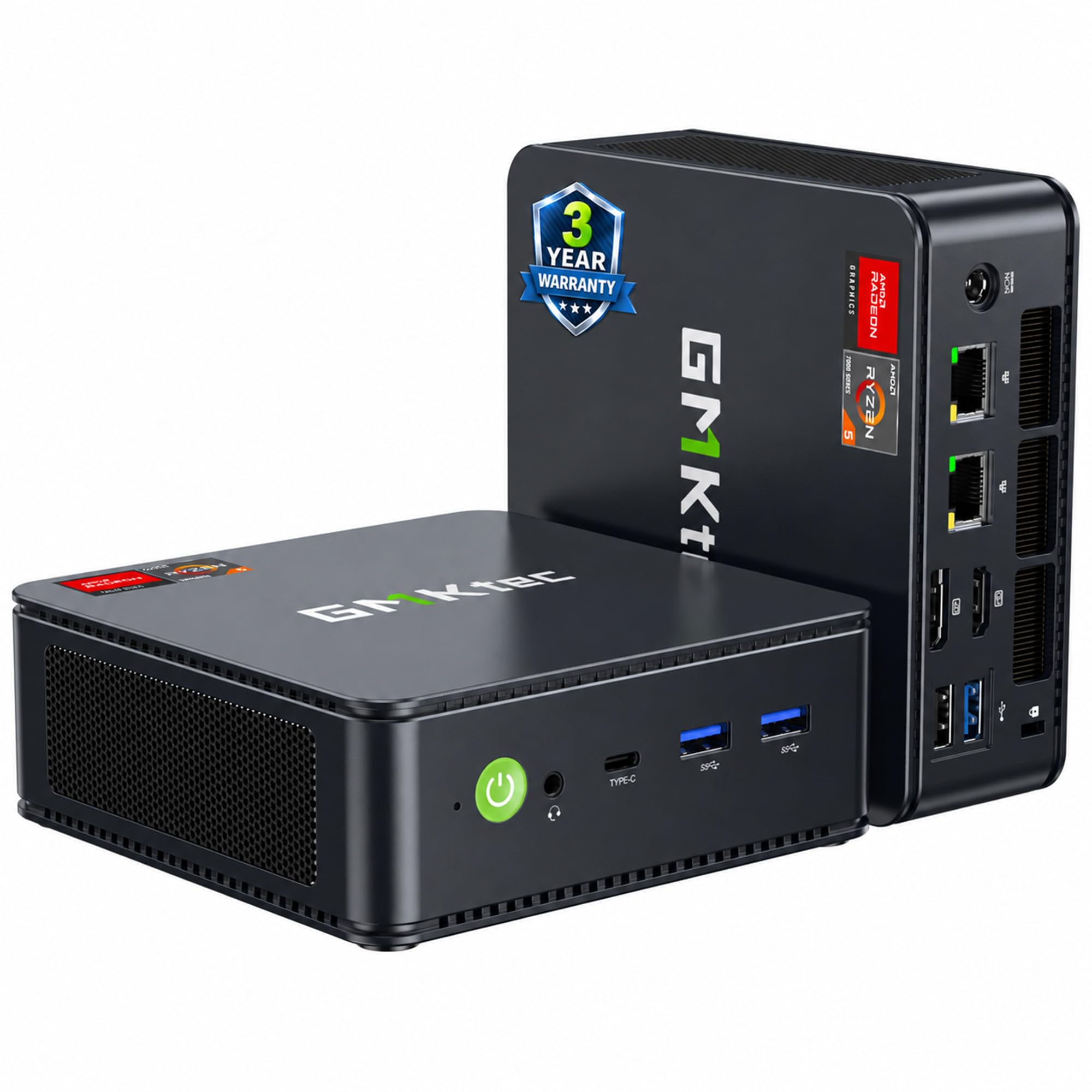
Two 16GB sticks of DDR5 is the number that settles this one for us. Memory is what a music PC hits first: a handful of sampled instruments and a reverb on every bus will take 16GB before the processor breaks a sweat, and 32GB of the fast stuff leaves room for a full template plus the browser tab you forgot was open. The case is small enough to sit under a monitor, which matters on a desk that already carries a keyboard and a controller.

The Ryzen 5 7640HS is a six-core Zen 4 chip, and for a DAW the clock speed counts as much as the core count — one plugin chain on your master bus runs on one core, so a processor that reaches 5GHz clears that bus faster than a wider, slower one. Storage is the other place it pulls ahead of the cheaper picks: a 1TB PCIe 4.0 drive streams sample libraries and records a multitrack take without needing the second, slower drive the Dell leans on.

The premium over the rest of this group buys that memory ceiling and a newer platform, and we think that's the right place to spend it. Fan noise is the one thing no spec sheet answers, and in a one-room studio it's the thing that ends up on the recording, so record a quiet take in the first week while the return window is open. Around the back, USB4, HDMI 2.0 and DisplayPort drive three displays, and the pair of 2.5GbE ports is the detail nobody asks about until the sample library lives on a NAS.

Pros

  • 32GB of dual-channel DDR5 out of the box
  • Six Zen 4 cores reaching 5GHz
  • 1TB PCIe 4.0 SSD keeps libraries loading fast
  • USB4 and dual 2.5GbE for fast external storage

Cons

  • Highest price of the machines here
  • No slot for a card-based audio interface
Our verdict

For projects built on sampled instruments, this is the pick: 32GB of dual-channel DDR5 and a 1TB PCIe 4.0 drive give a DAW the headroom the cheaper machines run out of.

Check Latest Price
2

Best Value

Dell Precision 3620

81 /100
LBD Score Excellent

Key details

Memory
32GB DDR4
Storage
512GB SSD (boot) + 2TB HDD (Storage)
Warranty
90 days, renewed
Processor
Intel Core i7-6700 (4 cores)
View on Amazon

The processor is a 2016 quad-core, and there's no point pretending otherwise — an i7-6700 is not what you buy in 2026 for a hundred tracks of software synths. What we like is everything around the chip: 32GB of DDR4, a 512GB SSD for Windows and the DAW, and a 2TB drive that exists purely to hold libraries, projects and the sample packs you keep meaning to sort. For tracking a band or mixing a rock record, that's a working studio for the money.

A tower earns its footprint in a studio, and this one uses the space properly. Ten USB ports across the front and back mean the interface, the controller, the iLok and the keyboard all have a home without a hub in the chain, and three spare SATA connections inside leave room for more drives later. HDMI plus two DisplayPorts covers a pair of screens, and the optical drive is a small gift if part of your library still lives on discs.

Two things to know going in. Wi-Fi and Bluetooth aren't part of the deal on these units, so plan on a cable to the router or budget an adapter. And a renewed tower with a 90-day warranty is a machine you back up: a drive that rattles or a card that quits is possible on any refurb, and the protection plan is worth more here than on a new mini PC. Mirror your project folder somewhere else and the worst case is an inconvenience.

Pros

  • 32GB of DDR4 already installed
  • Separate 2TB drive for samples and projects
  • Ten USB ports, so nothing needs a hub

Cons

  • No Wi-Fi or Bluetooth fitted
  • 90-day warranty on a renewed tower
Our verdict

The least expensive tower here, and still the most practical first studio machine: 32GB of RAM, a dedicated 2TB sample drive, and ten USB ports for your gear.

Check Latest Price
3

Best Compact

KAMRUI Pinova P2

88 /100
LBD Score Excellent

Key details

Memory
16GB LPDDR4 (16GB max)
Storage
256GB M.2 SSD
Processor
AMD Ryzen 5 5425U (4C/8T)
Display Outputs
Three 4K (HDMI 2.0, DP 1.4, USB-C)
View on Amazon

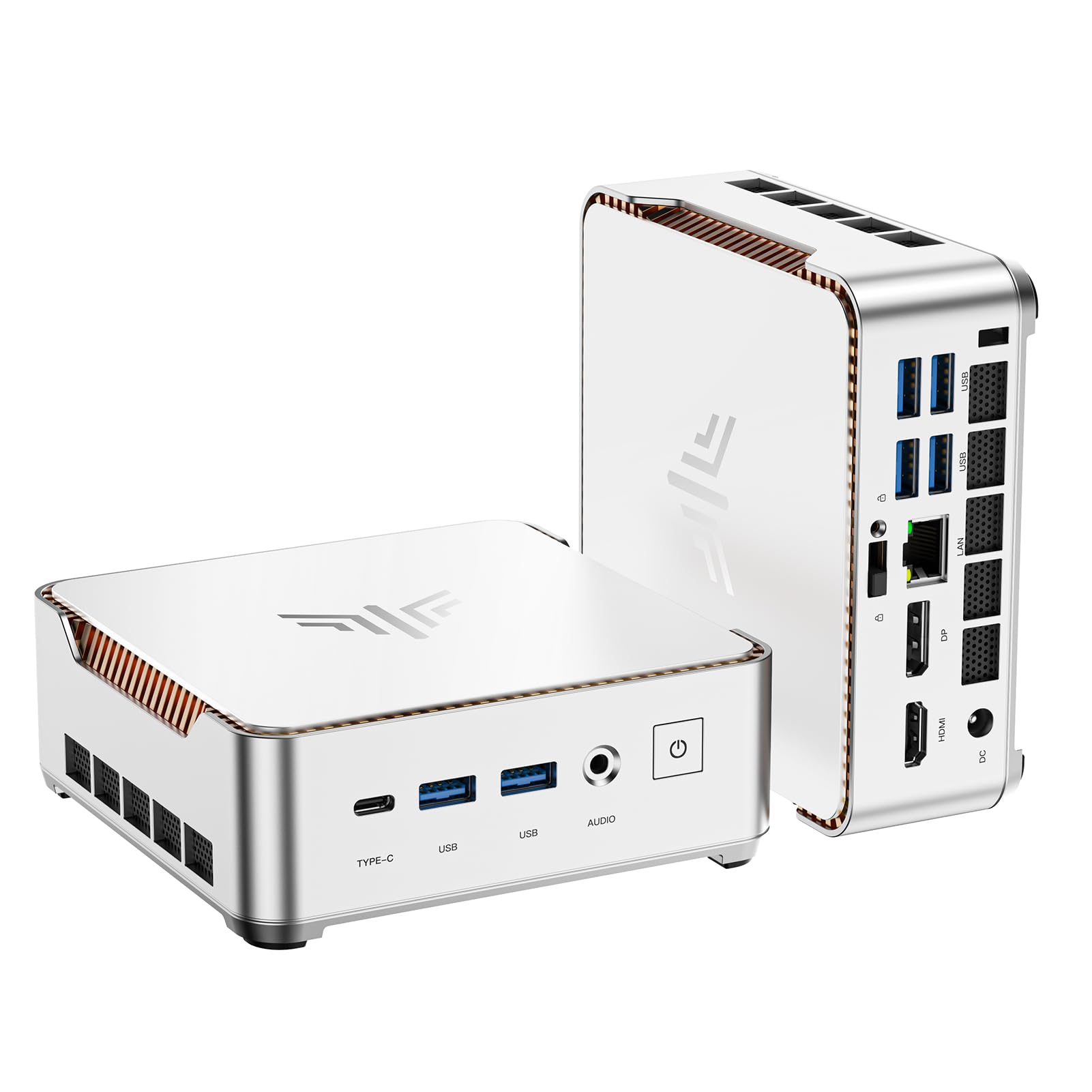
Nothing ruins a take like a fan spinning up in the corner, so the first thing we listened for was what this machine doesn't do. It stays quiet in a way a tower usually doesn't, and at 1.63 inches tall with a VESA plate in the box it can hang off the back of a monitor or tuck beside a controller without claiming a desk drawer's worth of space.

The Ryzen 5 5425U is a four-core, eight-thread part with 8MB of L3 cache, and for a one-person studio that's enough — a couple of dozen tracks, a soft synth or two, an amp sim and a bus compressor all fit. Where it stops is memory. The 16GB of LPDDR4 is also the maximum, so a template built on sampled orchestral libraries hits the ceiling long before the processor does, and there's no stick to swap later.

Storage is 256GB on an M.2 drive, fine for Windows, the DAW and a working project folder and tight the moment you start collecting libraries — plan on an external SSD for those. Three 4K outputs and seven USB ports cover a monitor, a second screen, an interface and a controller. Wi-Fi is the least consistent part of the package, so if the router is within cable reach, use it.

Pros

  • Quiet enough for a one-room studio
  • VESA plate included for behind-monitor mounting
  • Three 4K outputs and seven USB ports

Cons

  • 16GB memory ceiling with no upgrade path
  • 256GB drive fills fast with sample libraries
Our verdict

The one for a desk that has to stay quiet and clear: it disappears behind a monitor, and the fan keeps out of your recordings.

Check Latest Price
4

Light Sessions

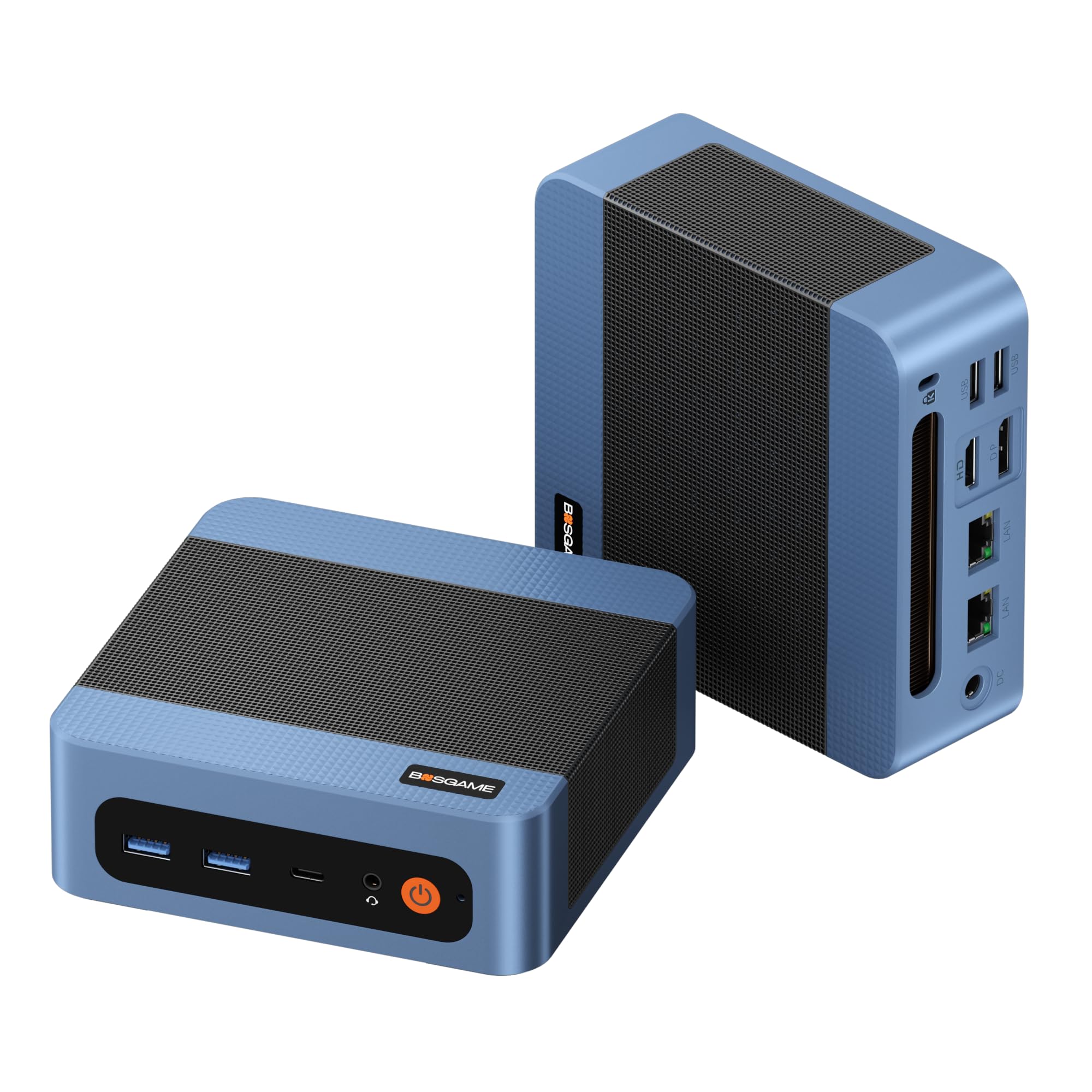
BOSGAME E5

86 /100
LBD Score Excellent

Key details

Memory
8GB DDR4 (8GB max)
Storage
256GB M.2 2280 SSD
M.2 Slots
2
Processor
AMD Ryzen 3 5300U (4C/8T)
View on Amazon

Eight gigabytes is the whole story, and it's worth being blunt: that's enough for a DAW, an interface and a couple of tracks, and not enough for a template that loads a sampled piano, a drum library and a reverb on every bus. What you accept that for is a genuinely small, quiet machine — a four-core Ryzen 3 5300U, Windows 11 Pro, three 4K outputs and the lowest price in this group.

What struck us about the rest of the package is how much of it is more thought-through than the money suggests. A second M.2 slot means the 256GB system drive isn't your only option — you can add a drive for samples and projects without cloning anything. Dual 2.5GbE is unusual on a machine this small and makes it a decent node if your library lives on a NAS, and the warranty runs a year on the whole machine with three on parts.

Buy it with the return window open and put it through a long session in the first week — a computer at this price is a calculated risk, and a year of whole-machine cover is what makes the risk reasonable. Then leave the heavy templates to whatever sits at the center of your studio and let this one handle the tracking, the podcast edit or the second room.

Pros

  • Lowest price in this group
  • Second M.2 slot for a sample drive
  • Dual 2.5GbE network ports

Cons

  • 8GB of RAM and no way past it
Our verdict

A tidy, quiet box for lean sessions and demos — just go in knowing that 8GB is both the starting point and the ceiling.

Check Latest Price

How We Tested These Music-Production PCs

We started with a short list of studio requirements: at least 16GB of RAM or open slots to add more, an M.2 SSD for streaming samples, cooling that wouldn't howl, and enough USB ports to run an interface, a controller, and a drive at once. That left 10 machines, which over the next eight months we set up one at a time on the same desk between a pair of studio monitors, in the room where I track vocals. Each got a clean install of the same DAW and plugin bundle, I timed how long it took to get from unboxing to a working session, and I taped off each one's footprint on the desk.

Then the real work: a 48-track session with virtual instruments and plugins on every channel. I stacked instances until the audio crackled at a 64-sample buffer and noted where each machine topped out, then timed a full bounce of a three-minute mix. Boot and project-load times got a stopwatch too, since the speed you feel every day matters more than a benchmark.

For noise, I set a condenser two feet away, recorded each chassis at idle and under load, and listened back on headphones — several were inaudible until the fans spun up. Ports got the same scrutiny: interface, MIDI keyboard, and external SSD at once, then a count of what needed a hub. I also streamed a sample library over Wi-Fi for an hour and paired Bluetooth headphones and a keyboard to see whether latency made either unusable.

Reliability was the slow part — overnight loops, a dozen cold restarts, and an opened case on the refurbished tower to confirm the drives and RAM matched the listing. Value came last: what each box cost against the session it could actually carry.

How to Choose a Pc for Music Production

Start With the Memory Ceiling

A DAW will run on 16GB, and the moment you load a sampled piano, a string library and a drum kit into the same project, it stops running well. Treat 16GB as the floor for a new machine and 32GB as the comfortable number for anything built on sampled instruments. What matters isn't the installed figure but the maximum: two machines here top out at whatever they ship with.

The second question is whether the memory is on replaceable sticks. SO-DIMM slots mean a computer bought this year can grow in two; soldered low-power memory means the number on the box is the number you live with. On a tight budget, a 16GB mini PC with room to add is a better long-term buy than a 16GB one without.

What a DAW Actually Asks of a Processor

Most of what a DAW does is single-threaded: one plugin chain on the master bus, one instrument on one track. That's why a fast four-core can feel better than a sluggish eight-core, and why clock speed deserves as much of your attention as the core count printed on the box.

Core count catches up when you run dozens of tracks at once or bounce stems. An older quad-core still tracks a band and mixes a rock record; six current-generation cores with high boost clocks handle heavier virtual instruments without the meter pinning. Buy the fastest single core you can afford, then let the core count follow.

Storage: Keep Samples Off the Boot Drive

Sample libraries are read constantly and change rarely, which makes them the one thing you genuinely want off the system drive. A 256GB boot SSD is plenty for Windows and a DAW and nothing at all once an orchestral library arrives.

Look for a second drive, a spare M.2 slot, or an external SSD on USB. A PCIe 4.0 drive streams faster than a SATA one, which shows up in load times more than in playback, and the BOSGAME's empty slot does more for a budget setup than a larger boot drive would.

Fan Noise and Where the Machine Sits

In a one-room studio the computer is a microphone input whether you planned for it or not. A fan that's inaudible at idle can be the loudest thing in the room under a heavy session, and no listing reports it, so buy somewhere with a return window and record a silent take in the first week.

Placement buys more than most people expect: a tower on the floor behind a desk sits further from a vocal mic than a mini PC on the desktop, and a VESA-mounted box behind a monitor is out of the room's sightline and its reflection path. Either way, keep it off the same surface as the mic stand.

New Mini PC or Renewed Tower

A renewed workstation gets you 32GB and a big drive for less than a new mini PC, and it arrives with a shorter warranty — 90 days on the Dell here, against a year or more on the new machines. That isn't a reason to walk away; it's a reason to decide before you order how you'll handle a failure.

Keep projects backed up to something that isn't the machine, hold on to the box and packing for the length of the return window, and consider the extended plan on a refurbished tower. On a new mini PC, the same money is better spent on a second drive.

Frequently Asked Questions

Final Verdict

For anything built on sampled instruments, the GMKtec M6 Ultra is the one to buy: 32GB of dual-channel DDR5 installed as two sticks, a 1TB PCIe 4.0 drive, and six Zen 4 cores that keep a heavy template out of the red. Everything else here is a way of spending less without giving up the job.

Pick the Dell Precision 3620 if a tower, a separate sample drive and ten USB ports matter more than a current-generation platform — just keep your own backups and expect to run a cable to the router.